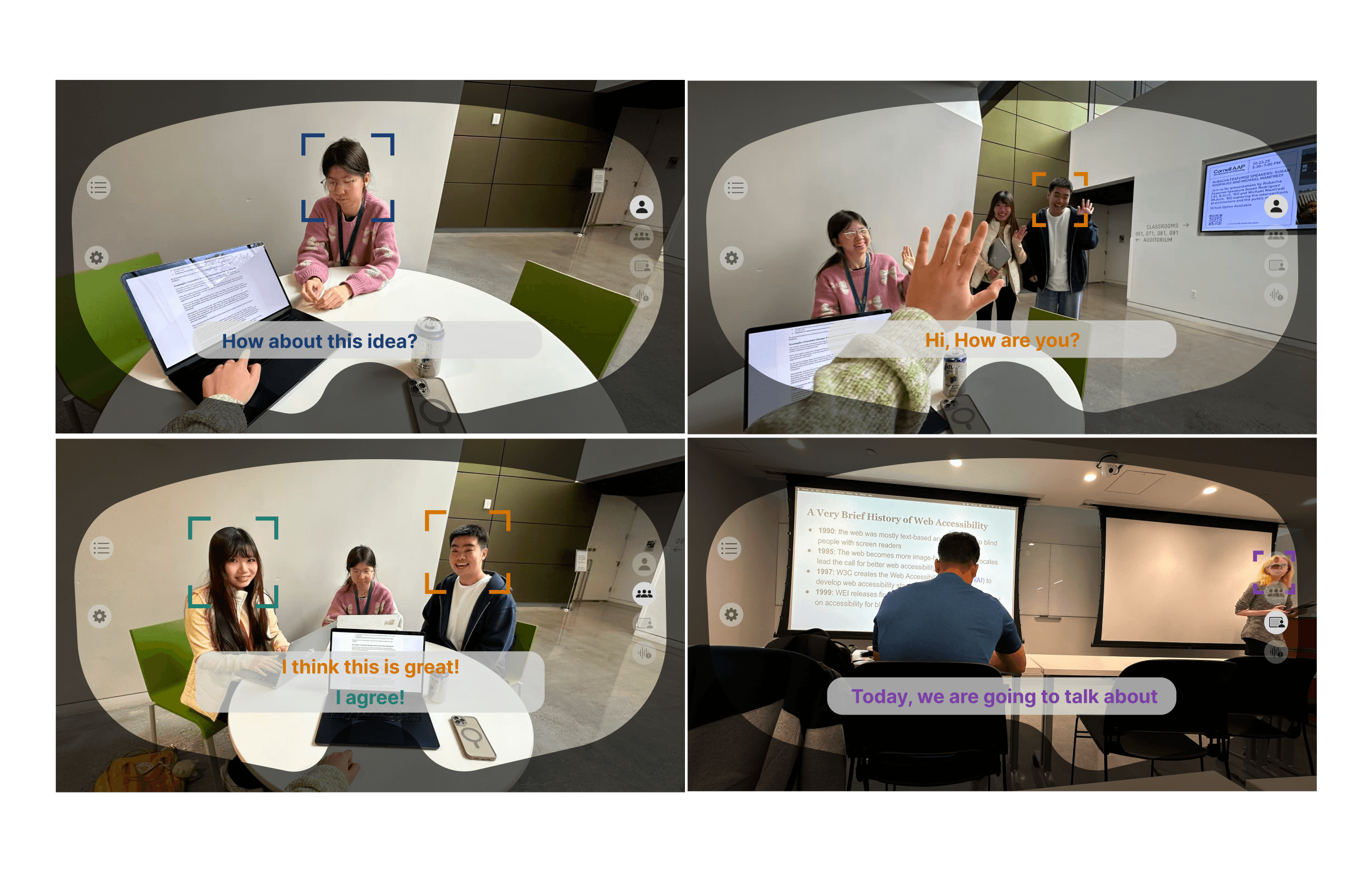
Restoring autonomy to the in-between user
DHH individuals who aren't fluent in sign language live between two worlds — excluded from the Deaf community due to language barriers, isolated from the hearing world due to communication fatigue. Existing tools don't solve this. They route through human interpreters, removing agency, or offer static one-size-fits-all captions that fail neurodiverse users entirely.
SignBridge Duo replaces human intermediaries with a context-aware AR system that adapts to the user's environment automatically.
What I owned
Design was split evenly across the team — we each owned a full iteration of the prototype, and co-directed the final video. My specific ownership was the environmental mode and surrounding-context design — how the system reads and responds to ambient space — plus one complete design iteration from scratch.
Finding the user
no one designed for
We started with Jessica Kellgren-Fozard, a late-deafened YouTuber who grew up hearing. She never acquired sign language as a first language — and even if she had, it wouldn't fully solve the problem. BSL, ASL, Auslan, and other sign systems aren't mutually intelligible. They're distinct linguistic cultures. A BSL user and an ASL user can't simply communicate, which means even within the DHH community, there's no universal fallback.
For someone who loses hearing later in life, neither world fits: not the hearing world that assumes you can still follow along, and not the Deaf community whose language and identity she never shared. We called this the "in-between" user — and no existing tool was built for this space.
Three iterations. One scenario.
With the user gap defined, we built a storyboard around Alex — a DHH professional navigating a chaotic airport. High background noise makes lip-reading impossible. He misses a PA announcement about a gate change and only realizes when the crowd moves. This scenario sharpened our design brief: the system needed to adapt to the environment, not the other way around.
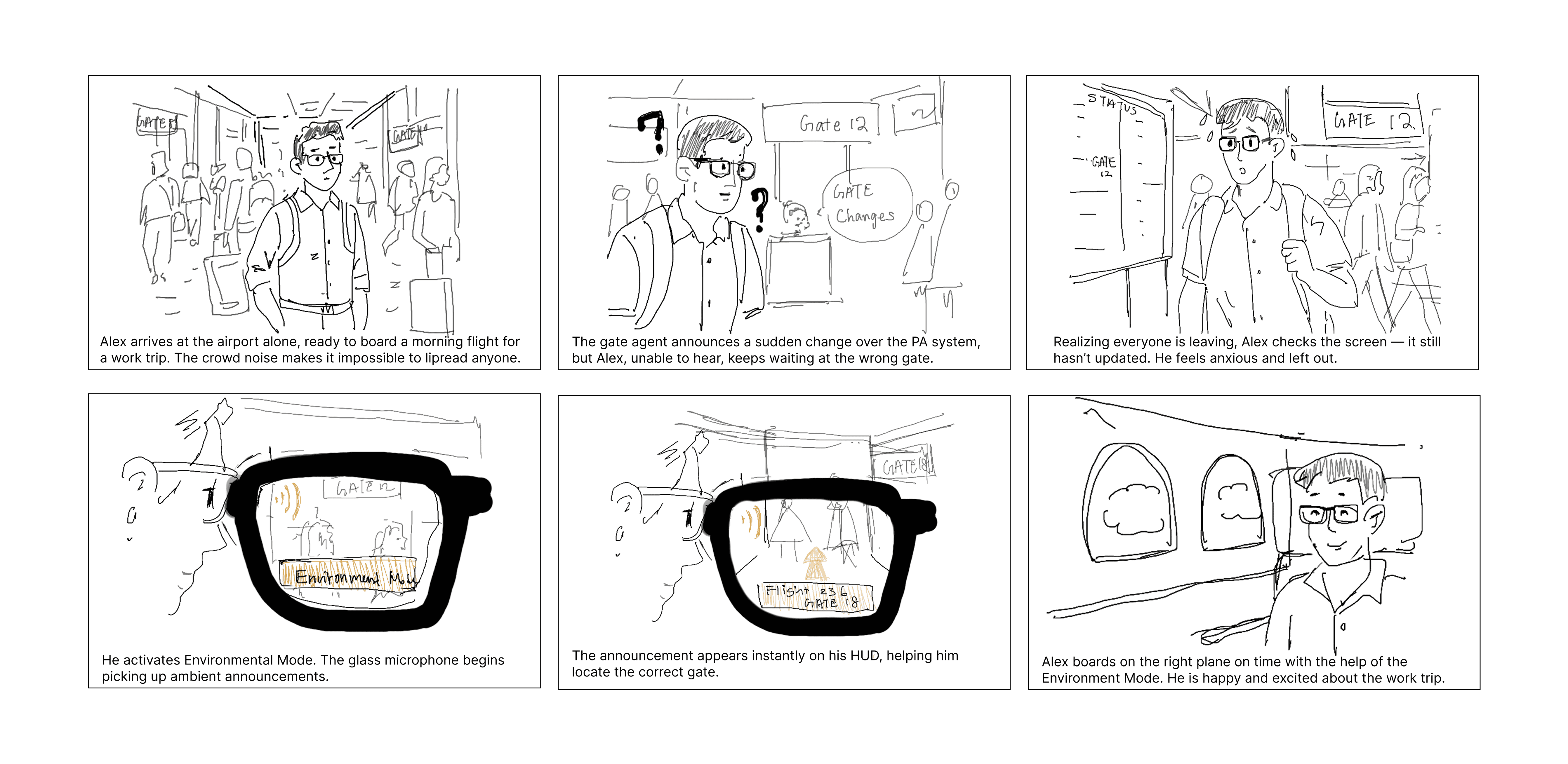
Storyboard: Alex's invisible barrier — the moment that defined our design direction
From that storyboard we ran three prototype iterations — each team member led one from scratch. We explored different approaches to information hierarchy, caption placement, and environmental awareness before converging on a shared system.
Each iteration pushed a different design question. Mine focused on the environmental and surrounding-context layer — how the glasses read ambient space and surface non-speech signals spatially. By iteration 3 we had enough signal to consolidate into a single horizontal structure.
Three prototype iterations — each team member led one
Consolidated system — all four modes side by side, before Jazmin consultation
From good design
to inclusive design
We brought our consolidated system to Jazmin Cano — Senior UX Research Specialist, Accessibility at Owlchemy Labs (now Google). Her feedback was specific: the design handled DHH users well, but it was missing an entire population — neurodiverse users whose DHH experience overlaps with ADHD and APD. That one observation reshaped what the product was.
Jazmin pointed out DHH needs frequently co-occur with ADHD and APD. This is where IID was born — a memory retention layer to catch critical verbal info before it fades, addressing the cognitive load overlap directly.
Our original alert used a red photosensitive flash. Replaced with shape-based cues — triangle warnings, border pulses — urgent without triggering photosensitivity.
Contrast and text size moved to the primary UI layer. If a user needs it, it shouldn't be three taps deep.
"An impressive example of inclusive design that prioritizes user autonomy. SignBridge Duo bridges the critical gap between raw information and meaningful, accessible communication."
Finalized screens. Then made it move.
With the post-consultation design system locked, we built out the finalized static screens — every mode, the IID layer, the safety redesign. Then we took it further: a real-world scenario video that put Alex's story in motion, co-directed and co-produced by the whole team.
Finalized design system — post-consultation · all four modes and IID layer · click to interact
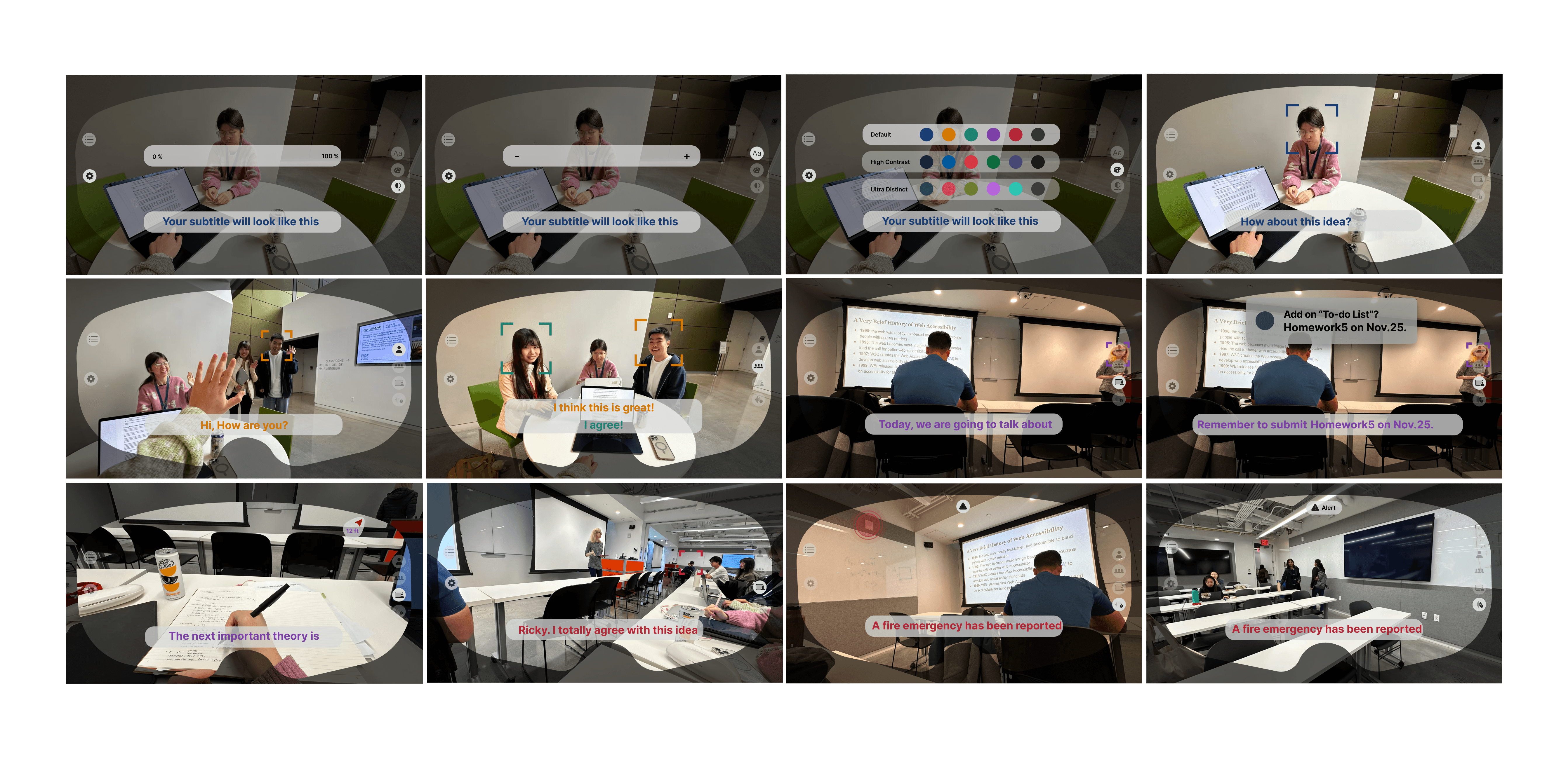
Full system overview — all modes, IID layer, and safety redesign
To demonstrate the system in a believable real-world context, we produced a scenario-based mini mockup video — scripted around Alex's airport journey, filmed and composited to show the AR overlay in a synthetic environment. The team co-directed and co-edited; I wrote the scenario script and storyboarded the shoot.
Through SignBridge Duo, I learned that accessibility is not a feature checklist — it's a fundamental architectural framework. By designing for the intersectional needs of DHH and neurodiverse users rather than treating them as a monolith, we built a system that adapts to the human, not the other way around.
The expert consultation was the most formative moment of the project. It taught me that the best design decisions come from admitting what you don't know — and that designing for the margins almost always improves the experience for everyone.
Innovation serves no purpose unless it restores autonomy to those who need it most.
The feature we cut —
and what I did after
We scoped out gesture translation early — the model accuracy needed to reliably translate between sign systems in real-time wasn't feasible for this project. But the question didn't go away. After SignBridge wrapped, I ran an applied ML study specifically to understand why gesture recognition is so fragile under real-world conditions, and what that means for any system that tries to use it.
When we cut gesture translation from SignBridge's scope, I wanted to understand why it was so hard — not just accept it as a technical limit. So I ran a separate study: how do gesture-recognition models actually fail under real-world conditions like occlusion, lighting changes, and rotation?
With co-researcher Mingyuan Pang, I tested classical ML models and a CNN across three gesture and expression datasets under four corruption types at three severity levels.
I led the video gesture experiments: preprocessing, CNN implementation in PyTorch, robustness evaluation, and the Results and Discussion sections. The findings answered my original question — and changed how I designed the IID fallback system.
| Corruption Type | CNN (video) | KNN (static) | Verdict |
|---|---|---|---|
| Blur | 90.9% | 96.0% | Resilient |
| Brightness | 63.6% | 30.0% | Fragile |
| Occlusion | 39.1% | 17.3% | Critical failure |
| Rotation | 26.2% | 45.0% | Fragile |
These weren't just interesting data points — they became design requirements.